That Blurred-Out Screenshot You Shared Might Not Actually Be Redacted
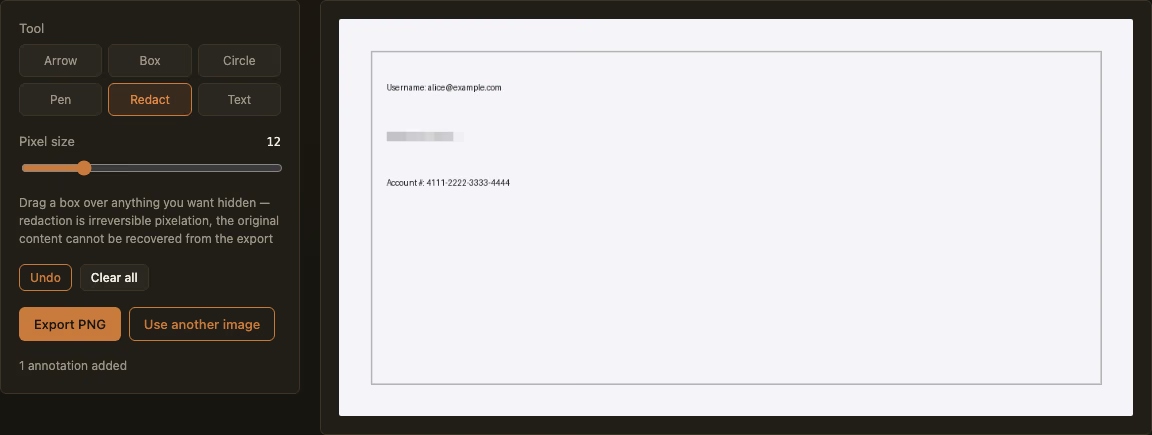
Sharing a screenshot with a password field, an account number, or an address visible, the usual instinct is to blur it out before posting. It looks hidden. The problem is that a standard Gaussian blur doesn’t destroy the underlying pixels — it mixes them together in a mathematically reversible way, and tools that reconstruct blurred text from the blur pattern itself are well known and have been used for exactly this in the past, on documents that were assumed to be safely redacted before release.
Why blur isn’t the same thing as redaction
A blur filter averages each pixel with its neighbors — the original values are smeared, not deleted. Given the blur radius and enough context (a limited character set, a known font, the surrounding layout), that smearing can be partially or fully undone. This isn’t an exotic attack: it’s been demonstrated against blurred license plates, blurred faces, and blurred text in leaked or officially released documents more than once. True redaction has to replace the original pixel data, not just visually obscure it — if the original values are still mathematically present in the image, in any form, they’re not actually gone.
What real redaction looks like
Open the Annotate Screenshot tool, pick the Redact tool, and drag a box over whatever needs to disappear — a password, an API key, an account number, a private message. This replaces the pixels in that region with block averages, genuinely destroying the original data rather than layering something on top of it. The original pixel values simply aren’t present in the exported file — there’s no blur pattern to reverse, because there’s nothing left to reverse.
One thing worth stating plainly: redaction only covers the regions you actually draw over. Give the export one more look before sharing it, especially if the sensitive text runs slightly wider than the box you dragged.
The upload question matters here more than usual
For most image tools, “does it upload to a server” is a nice-to-have privacy detail. For a redaction tool specifically, it’s the entire point — what you’re hiding is, by definition, the exact thing that should never leave your device in the first place. A tool that asks you to upload the un-redacted original to get back a censored copy has already defeated the purpose: the sensitive original made a round trip through someone else’s server before you ever saw the “safe” version. This tool runs entirely in your own browser — not a single byte of the original image is transmitted anywhere, and it keeps working even offline.
Beyond redaction, the same tool draws arrows, boxes, circles, and text for the more everyday case — pointing at a bug in a screenshot for a support ticket, marking up a step in a how-to guide. Exports are always a clean PNG at full resolution, with nothing stamped on top.